Session Guard: find out who is sharing your course accounts
If you sell courses, memberships or subscriptions, you have probably wondered how many people are really using one login. I built Session Guard to answer that, and I am releasing it for free on WordPress.org.
The problem
One student pays, and the password goes to a friend, a partner or a whole group chat. Blocking people blindly makes honest customers angry, so first you need to know what is actually happening.
How it works
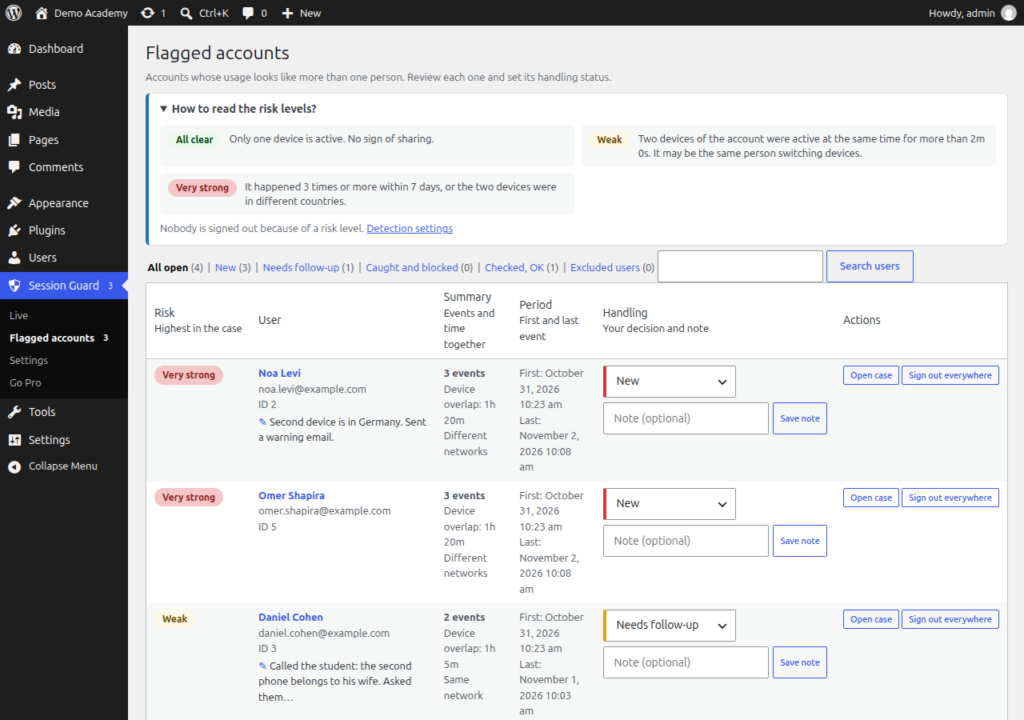
Session Guard watches for overlaps: two devices of the same account active at the same moment. One person switching from a phone to a laptop does not count for long, but two devices active together for minutes, from different networks or different countries, is a strong sign of sharing.
Every overlap gets a risk level, from weak to very strong, and accounts above the level you choose appear under Flagged accounts with a sentence in plain language, for example: "Two devices were active at the same time 3 times in the last 30 days. The devices were in different countries." You then give each case a status (new, needs follow-up, caught and blocked, checked and fine) and write a note.
Monitor first, enforce later
Session Guard starts in monitor-only mode: nobody is signed out. Look at the flagged accounts for a few days, and when you are comfortable, switch on the device limit so the oldest device is signed out when someone signs in on a new one.
Free and Pro
The free plugin includes live view, detection, handling and the device limit. Session Guard Pro adds video detection (so you can see that both devices are really watching), email alerts, per-user limits and LearnDash support.